
Learning Management System (LMS)
Run online lessons with video and an interactive chessboard, organise materials, assign homework and track student progress.
Chess.Run brings together the school dashboard, coach workspace, online lessons, chessboard, materials, subscriptions, charges and payouts. One completed lesson updates the whole school — learning records, student balances, coach earnings and finances.
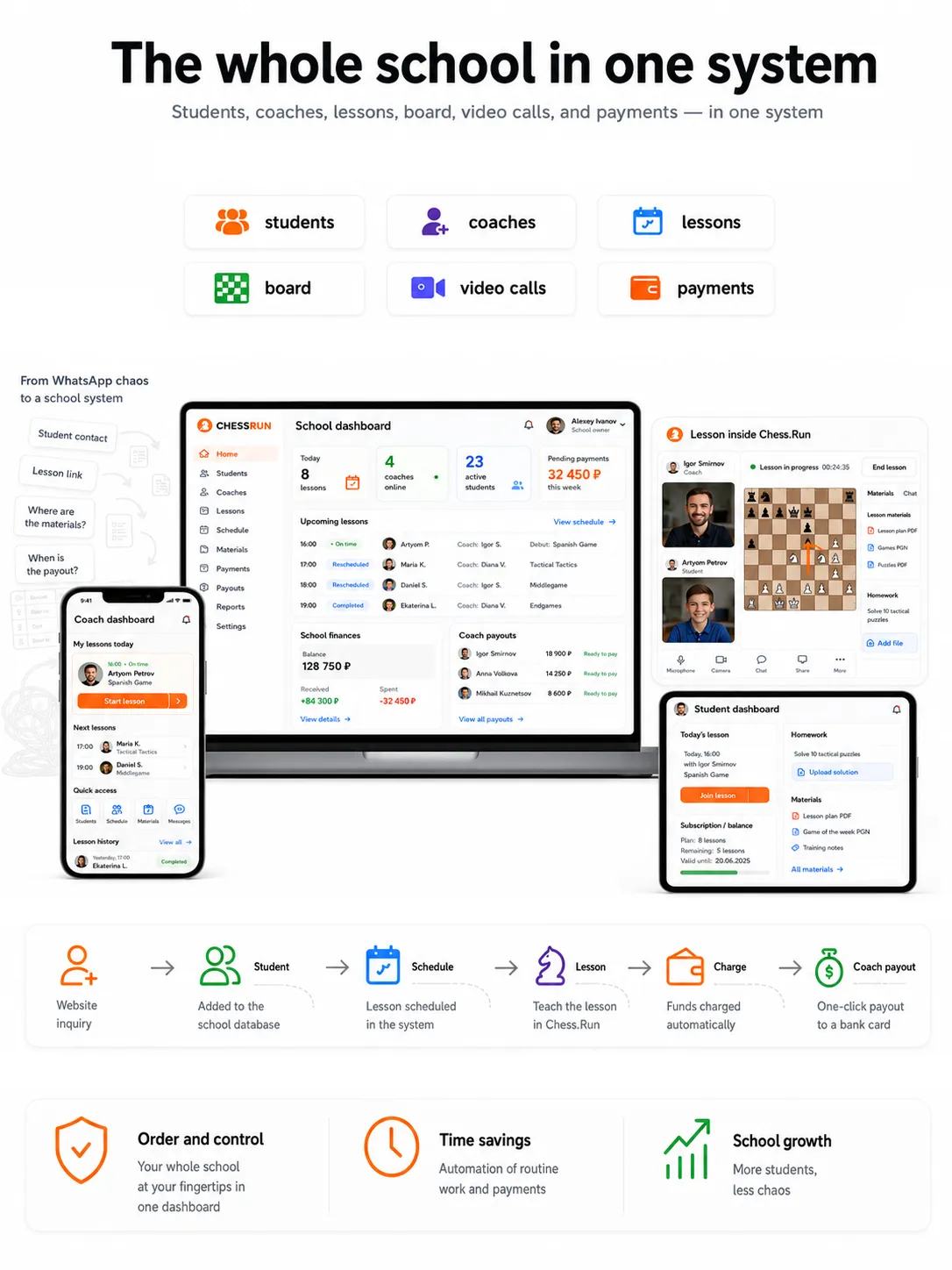
Chess.Run connects the learning process with day-to-day school or academy operations instead of separating them into different tools.
Run online lessons with video and an interactive chessboard, organise materials, assign homework and track student progress.
Manage coaches, students, groups, schedules, subscriptions, balances, charges, earnings and payouts.
A completed lesson updates both learning records and the operational data used by the school or academy.
Launch a branded website, login experience and school workspaces on your own domains while Chess.Run powers the LMS and school operations.
You do not need to move the whole student base on day one. Add one coach, one student and one subscription, schedule a lesson and see how Chess.Run connects the coach workspace, online class, student charge and coach earning.
Direct registration opens the school workspace and owner role.
The coach gets a workspace, and the student gets a profile, history and lesson access.
Set a lesson package or balance so charges are tied to real lessons.
The lesson appears in the school schedule and in the coach workspace.
After class, the system charges the student, adds the coach earning and updates school finances.
Set up the coach, student, schedule and subscription once. Then the coach runs the lesson in Chess.Run, closes it, and the system updates learning and financial records automatically.
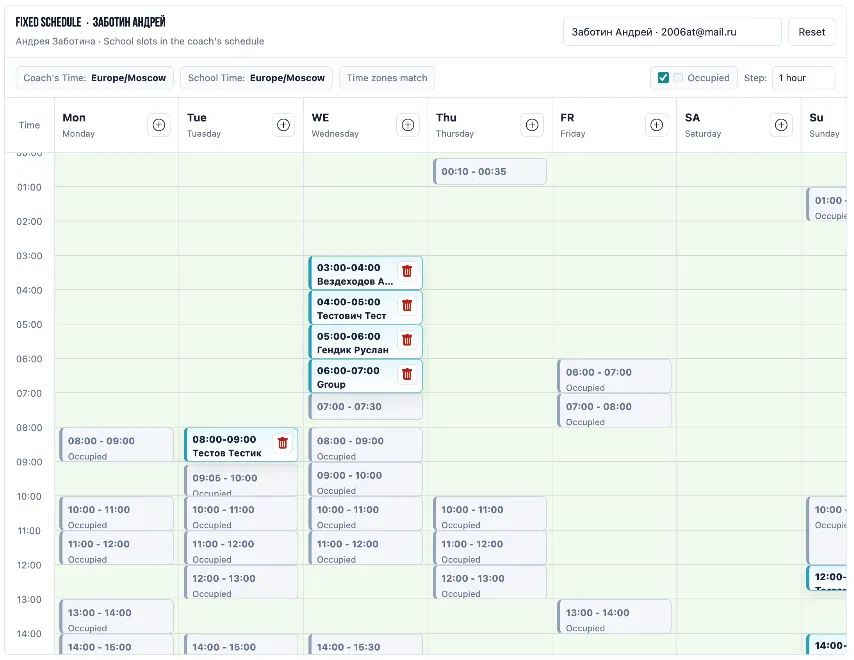
The school schedules a one-time or recurring lesson, and it shows up in the coach account. No chat links, no manual reminders: student, time, materials and lesson entry are already there.
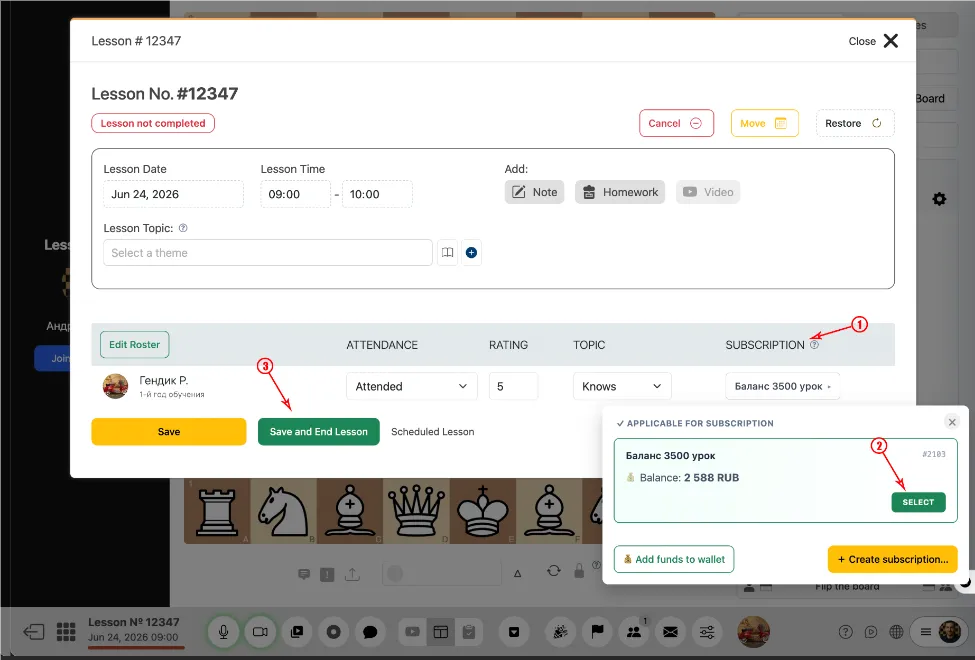
Video, chessboard, materials and homework are available inside the lesson. After class, the coach closes it and the system understands that the lesson was completed.
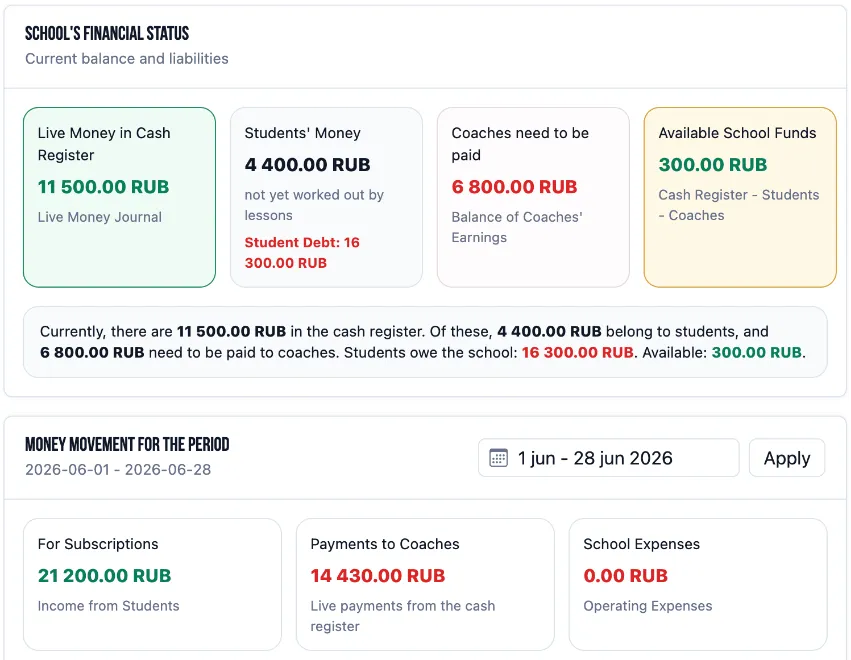
Chess.Run charges the student subscription or balance, adds the coach earning, updates the coach balance and reflects the change in school finances.
Admins see students, coaches, schedule, subscriptions, charges, coach earnings and reports.
Coaches see their lessons, students, materials and earnings for completed classes.
Students get quick lesson access, lesson history, materials and homework.
Video, chessboard, chat, materials and tasks work inside one lesson.
One-time and recurring lessons are tied to coach availability and learning groups.
Track lesson packages, top-ups, charges and remaining student balances.
Earnings appear after completed lessons, and the coach sees exactly what each amount came from.
Lesson plans, files, games and homework stay next to the learning process.
Admins see teaching and financial status without rebuilding reports from spreadsheets.
Financial accounting in Chess.Run is tied to real lessons. When a lesson is closed, the system charges the student, adds the coach earning and updates balances.
Top-ups, charges and remaining balance are connected to the schedule and lesson history.
The coach sees earnings by lesson, student and date, while the school sees what is ready to pay.
Earnings collect in a transparent coach balance, so payouts are easier to verify and close.
Pricing is loaded from the school billing plans and depends on the number of active trainers. Every plan includes school CRM, online lessons, scheduling, subscriptions, charges and payouts.
School subscription: up to 5 trainers. Each active trainer gets maximum coach access while the school day is paid.
School subscription: up to 20 trainers. Each active trainer gets maximum coach access while the school day is paid.
School subscription: up to 60 trainers. Each active trainer gets maximum coach access while the school day is paid.
A 14-day trial is available after school registration. In the school dashboard, billing works through the school balance and is charged daily.
Chess.Run does not replace teaching. It gives the coach a working place and gives the school automatic accounting after every completed lesson.
Add a coach and a student, schedule a lesson, close it and see how the system updates the subscription, coach balance and school finances automatically.
No. The school has direct registration. The system creates the owner user and the school workspace.
Yes. Start with one coach, one student and one subscription, test the full cycle, then move other flows step by step.
The coach sees their school lessons, students, materials and lesson history in a personal workspace. After a completed lesson, the coach can also see the earning for that lesson if the school uses coach settlements.
The online lesson can run inside Chess.Run with video, chessboard, materials, chat and homework. The school does not need to build the lesson from several separate tools.
No. A student can join from the browser by link or from their personal account.
The system can charge the student subscription or balance, add the coach earning and update the school financial view.
Yes. The coach workspace shows earnings for completed lessons, so the school and coach understand which lessons formed the amount.
The school can track subscriptions, student balances, lesson charges and financial history.
Both. The LMS side connects lessons, materials, homework and student progress, while the CRM side connects coaches, schedules, subscriptions, charges, earnings and finances.
Yes. A school or academy gets the same connected setup: owner, coach and student workspaces, online lessons, learning materials, scheduling and payment management.